
On-site collection
Manage capacity, time slots and waitlists
The overall capacity limits the event. A Time slot field also lets you offer times with their own capacity.
Updated on
Before you start
- Open the form builder.
Steps
Set the capacity
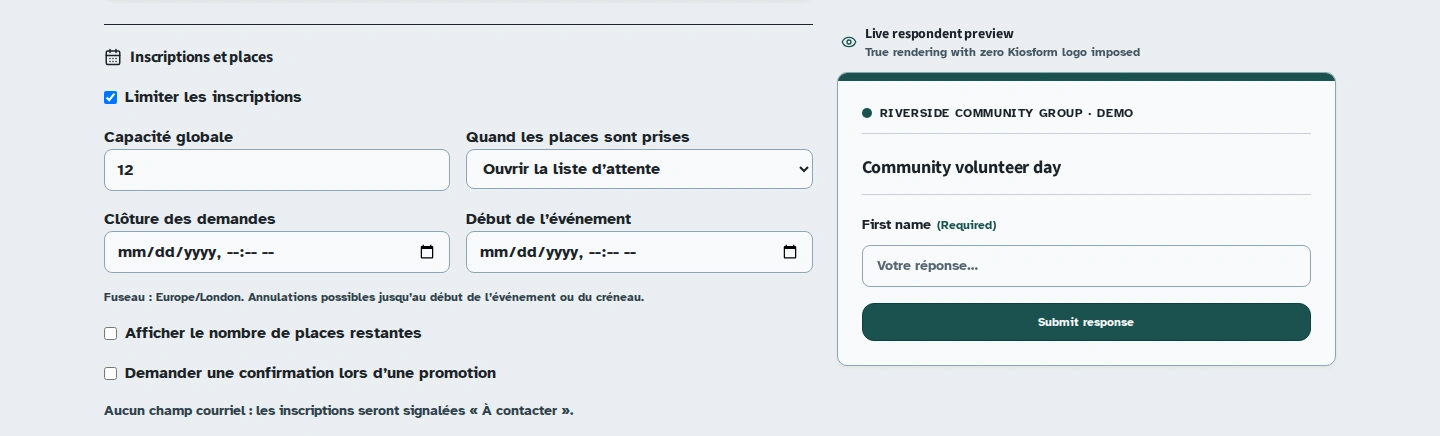
Under “Inscriptions et places” (Registrations and capacity), select “Limiter les inscriptions” (Limit registrations) and enter the “Capacité globale” (Overall capacity). The other registration settings appear.
Choose what happens when the event is full
Under “Quand les places sont prises” (When all places are taken), choose “Ouvrir la liste d’attente” (Open the waitlist) or “Fermer les inscriptions” (Close registration). Enable the remaining-places display if you want participants to see it.
Add time slots if needed
Add a Time slot element. Enter the start and end of the series, the duration and the capacity per slot, then use “Ajouter la série” (Add the series). Review the dates, labels and capacities shown.
Prepare the follow-up
Add an Email field so you can send registration information. Without an address, the dashboard shows “À contacter” (Contact needed). You can require confirmation when someone is offered a place from the waitlist and set a confirmation deadline.
Publish and monitor registrations
Publish the form. In the responses, check the registration dashboard for statuses, waitlist positions and people to contact. Participants can view and cancel their registration through the link they receive.
When a place becomes available
Places are offered to people on the waitlist in arrival order. Without a confirmation deadline, the first person is confirmed directly. With a deadline, they receive an offer to confirm. If it expires, the place can pass to the next person.
A request saved on an offline kiosk does not guarantee a place. The server determines its status and waitlist position when it syncs.
Troubleshooting
I cannot reduce the capacity
Capacity cannot be reduced below the number of places already taken. Review confirmed registrations before changing the limit.