
Potluck sign-up
Salads, desserts, equipment: list what your community or church meal needs and set the quantities. Each participant chooses what to bring; you can check confirmed contributions in your workspace.
Publish with Pro, 30-day Event Pass or Network. Compare the plans to choose one for your event.
- Hosted in the EU
- Built-in GDPR tools
- No advertising trackers
Set out what you need before sharing the link
Describe each unit: a cake for eight people, a serving bowl or a bottle. The quantity sets how many participants can take that item. Each person takes one unit of each item they choose.
Fictional meal example, separate from your event’s availability
- Salad to share
- 1 contribution needed
- Dessert for eight people
- 2 contributions needed
- Large serving bowl
- 1 contribution needed
Prepare the list and invite participants
Define the contributions
Add items and quantities to your form. Separate lists can keep food and equipment apart.
Share the form
Send the link or QR code. Participants see the remaining quantity; an exhausted item stays visible and is marked as already taken.
Check confirmations
On submission, the server checks all choices together. If an item has just been taken, none of the choices is reserved. The participant can choose again without losing their other answers.
See who is bringing what
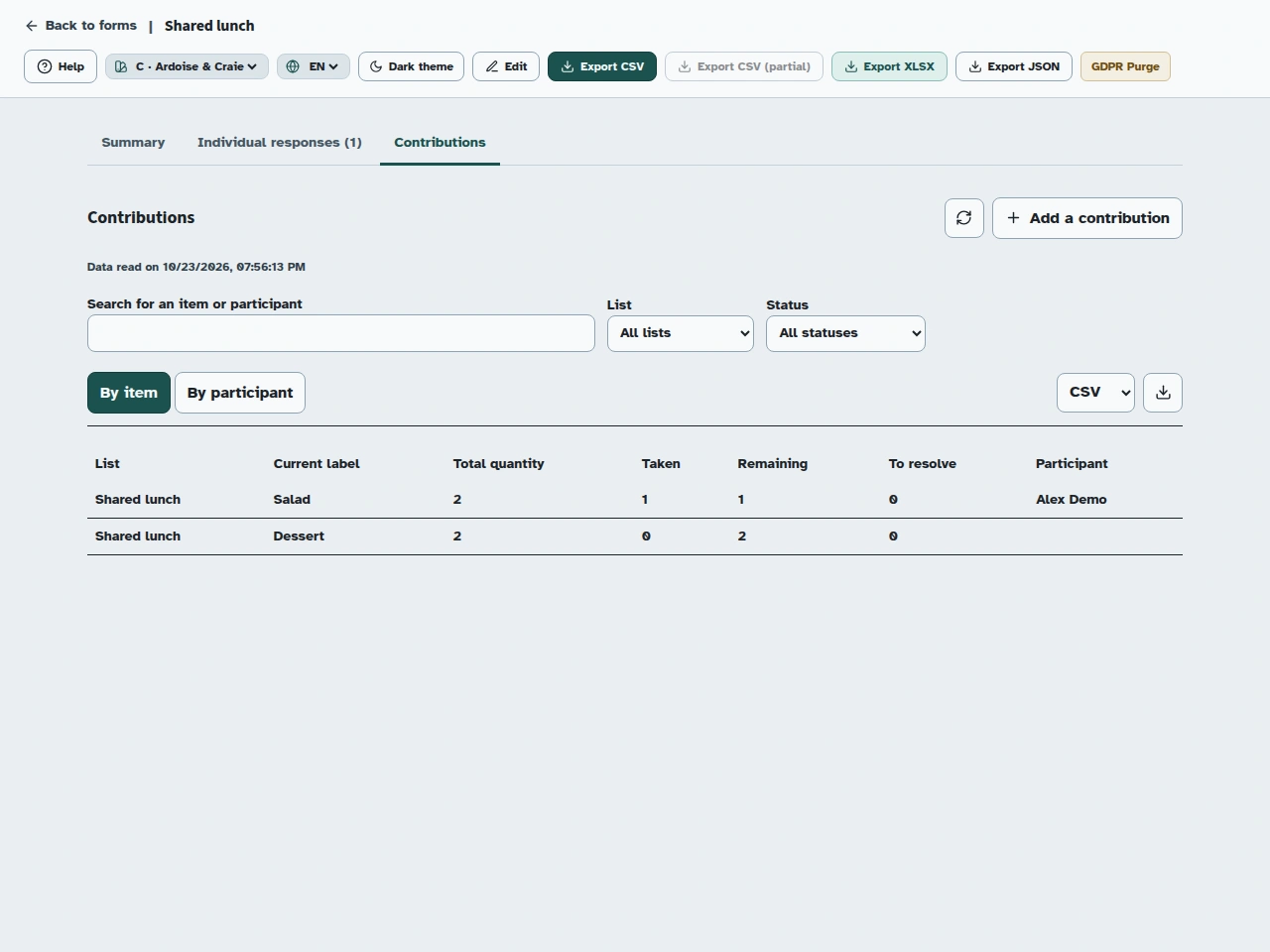
In your private workspace, view contributions by item or participant, remaining quantities and choices to resolve. CSV and XLSX exports help your authorised team prepare for the event.
After submitting online, participants see a personal link to keep; it is not sent by email. They can use it to cancel a contribution and make a confirmed unit available again. When changing items, the original choice is kept if the new item is no longer available.
Planned offline kiosk contributions
Once the native interface is available, a request saved offline will not reserve any items. When the connection returns, all choices will be confirmed together if stock allows. If even one item is unavailable, the whole request will need the organiser’s attention, with no partial reservation.
The kiosk contribution interface is still in preparation. This preview is not a tablet acceptance test; checks on a physical device are required before it opens.
Public names are the participant’s choice
Public availability shows quantities. Displaying a name needs the participant’s consent, even when the organiser enables the option. Participants can later remove that name without cancelling their contribution. Addresses and personal links stay private.
Contribution questions
Can someone choose several items?
Yes, if the organiser allows it: for example a dessert and a serving bowl. Each response can take one unit of each item, not several units of the same item.
What if two people choose the last dessert?
Only the first request confirmed by the server takes that unit. The other participant sees updated availability and can adjust their choices.
Can participants suggest their own items?
This first version uses the fixed list prepared by the organiser. Participants cannot add their own items here.
What happens to a published list after a plan change?
An existing published list keeps working while that version stays online. Publishing or republishing a version with a contribution list requires an eligible plan.
Set up your form in Kiosform.
Choose your questions, check the preview and publish when your form is ready.
Create my formView plansOn the ground
Get ready for your next gathering.
Offline tablet forms
Set up your kiosk, collect responses, and check that they arrive when the connection returns.
Community registrations
Plan a gathering, recruit volunteers, and ask for the information you need.
Event registrations
Organise time slots, track available places, and manage cancellations.
Attendance and signatures
Prepare a session's participant list, collect signatures, and review attendance.
Membership applications
Collect requests to join your community group and follow up with your team.
Tablet feedback surveys
Collect visitor feedback while the experience is still fresh.